|
SWP Features
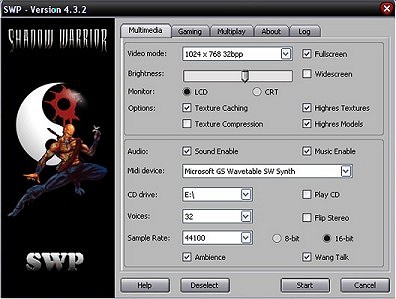
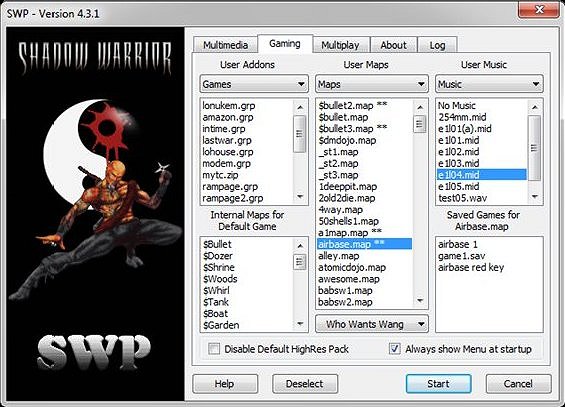
Screenshots
SWP.exe is totally compatible with the standard
Shadow Warrior Port by Jonathan Fowler.
SWP.exe has some fixes and several new features not yet found in JFSW.
SWP now also comes with its own SWPSetup.exe and SWP.cfg files.
SWP will now also read any User.def file present.
Updates to v4.0.9
Added Usegoodalpha in the form of Alpha Channel in Menu.
Updates to v4.0.8
Fixed the Load Saved Game - Y/N which got messaed up in 4.0.6
Updates to v4.0.7
Fixed Multiplay messages.
Fixed Video Options Menu crash.
Updates to v4.0.6
1. Fixed Video Menu memory leak crash.
2. Fixed 8bit mini status bar.
3. Fixed Multiplay modes.
4. Added Menu text color adjustment in Video Options.
5. Adjusted new minibar armor box to fit in multiplay.
6. Adjusted several menus to accomodate multiplay.
7. Added new multiplay highres statusbar to Swp.grp.
8. Added Multiplay option to SWPStartup.
Updates to v4.0.5
1. Added additional Screen Menu
2. Fixed Screensize option
3. Fixed windowed caption
4. Fixed /? command
5. Added Commmandline option to Game Menu
6. Commandline options in SWP.log
7. Dumped UseSwpStatus and HrpZipLoader options as these are now permanent.
Updates to v4.0.4
1. Added new Main Menu
2. General adjustmenst to menus
3. Adjust Ninja Troat animation for Highres
Updates to v4.0.3
1. Fixed the saved game problem created in 4.0.2
2. Added Texture Filtering to Screen menu.
3. Added Anisotropy options to Screen menu.
4. Added High Tile option to Screen menu.
5. Added Model option to Screen menu.
6. Removed large Statusbar when in Screen menu.
7. Added option for Weapon icons in small Hud.
8. Fixed "Shurikens" pickup when it supposed to be "Darts"
9. Added Player/Wang Talking option.
10. Added SWP version number to startup splash screen.
11. Improved on crosshair accuracy.
Updates to v4.0.2
1. Increased max screenwidth from 1600 to 3072.
2. Autosize of cursor icon in menus.
3. Added Mouse Scale X and Y in Mouse settings.
4. Added a 'More..' option to a seperate Submenu.
5. Added 'Help/Hint' line for this menu.
6. Fixed SWP Startusbar on/off
7. Added weapon icon selections to small hud (icons in SWP.grp)
8. Added new set small Red Fonts to SWP.grp
9. Changed how the new key cheats work.
10. SwpBuild compatible.
Updates to v3.9.x
Ninjas
Added a small hack where the Ninjas no longer revertback to 8 bit textures.
Updates to v3.9.6
User Addon Hrp
If you have a Hrp for your TC or Addon, just name it as the same name as the Grp file and add _hrp.zip, then put it in the same folder and SWP will load it.
For example lets say someone makes an Hrp for LoNukem and wants it loaded, now if LoNukem.grp is in the 'Games' folder and using the command:
'SWP.exe -gC:\SWP\Games\LoNukem.grp'
then SWP will autoload the LoNukem_hrp.zip
New Cheats
See 'Additional Cheats' below.
Vista Sound
SWP now fixes the sound problem experienced by several Windows Vista users.
FOV Setting
SWP now has a configurable FOV (Field of View) in the Menu.
Together with a Widescreen option, a suitable view can be found for all.
Thanks to Plagman for making these enhancments possible.
Commandline extras
/cFilename
The filename stated in this option will replace the standard SwCustom.txt
/jDirectory
The directory/folder stated in this option will be added to the search path.
/game# (0-9)
SWP can now also load any saved game.
Example: SWP.exe /game2 will load the saved game game2.sav
SWPSetup.exe
As SWP now comes with its own SWP.cfg startup config file this needs to be generated
using the enclosed SWPSetup.exe
Sw Hrp
If the zipped High Resolution Pack (Hrp) is in the root folder and goes by the name Sw_Hrp.zip it will get auto loaded.
In this case the temp SWP.grp file will be ignored.
Midi Music
SWP now plays all .mid music from the Swcustom.txt file.
All .mid files can go into a Folder (directory) called Music
SWP now also recognises a Maps folder and if there is a *.mid file with the same name as the *.map it will be used as the level music.
CD Music
SWP now plays all CD music from including the Swcustom.txt files cdatracks.
Maps folder
SWP will see a folder called Maps which should be off the root folder.
This folder can hold all your user maps and extras.
Alt Fire
SWP now has a configurable AltFire key accessible in the Menu.
Save - Load
Several menu advances with save/load display information.
Current MapName and Title as well as game Time is displayed.
Compass
A new compass has been added for the Hud.
Skill
Fixed the missing skill with some TCs.
Auto Weapon Switching
There is an option in the Controls section of the Sw.cfg file under:
[Controls]
NoWeaponSwitch = 0
Setting this to 1 will disable all auto weapon switching.
There is also an option in the Menu in the game to set this.
Usermap Exit
When completing a Usermap it will now exit to the main menu instead of restarting the map again.
Huds
When pressing the '-' and '+' keys 2 additional Statusbars will be noticed which run with the enlarged
screen giving the player an extra advantage.
These 2 statusbars are identical except that one is completely transparent.
Keys
During the normal game when picking up a key, whether it is a key card or a skeleton key,
the Player retains the key even after using it.
This tends to obscure the Players vision of the keys when picking up another key of the same color.
SWP will remove the key from the Players posession once the key has been used.
Additional cheats
SWGOD - Toggle god mode
SWMEDIC - Adds 25% Health
SWKEYS - Gives ALL 8 keys
SWREDCARD - Gives Red Cardkey
SWBLUECARD - Gives Blue Cardkey
SWGREENCARD - Gives Green Cardkey
SWYELLOWCARD - Gives Yellow Cardkey
SWGOLDKEY - Gives Gold Skeleton key
SWSILVERKEY - Gives Silver Skeleton key
SWBRONZEKEY - Gives Bronze Skeleton key
SWREDKEY - Gives Red Skeleton key
SWGUN# - Gives weapon 2 to 0
Swcustom.txt
See standard included Swcustom.txt.sample file.
NB. All or only part of the Swcustom.txt file can be filled in.
level 1
{
title "Seppuku Station"
filename "$bullet.map"
song "e1l01.mid"
cdatrack 4
besttime 60
partime 300
}
level 2
{
title "Zilla Construction"
filename "$dozer.map"
song "e1l03.mid"
cdatrack 4
besttime 300
partime 480
}
episode 1
{
title "Enter the Wang"
subtitle "Four levels (Shareware Version)"
}
episode 2
{
title "Code of Honor"
subtitle "Eighteen levels (Full Version Only)"
}
skill 1
{
name "Tiny grasshopper"
}
skill 3
{
name "Who Wants Wang"
}
inventory 1
{
name "Armor Vest +50"
amount 50
}
inventory 2
{
name "Kevlar Armor Vest +100"
amount 100
}
inventory 3
{
name "MedKit +20"
amount 20
}
inventory 8
{
name "Caltrops"
amount 3
}
weapon 1
{
name "Fists"
mindamage 10
maxdamage 40
}
weapon 2
{
name "Sword"
mindamage 50
maxdamage 80
}
weapon 5
{
name "UZI Submachine Gun"
ammoname "UZI Clip"
maxammo 200
mindamage 5
maxdamage 7
pickup 50
weaponpickup 50
}
weapon 6
{
name "Missile Launcher"
ammoname "Missiles"
maxammo 50
mindamage 15
maxdamage 30
pickup 5
weaponpickup 5
}
fortune
{
"You never going to score."
"26-31-43-82-16-29"
}
gotkey
{
"Got the RED key!"
"Got the BLUE key!"
"Got the GREEN key!"
}
needkey
{
"You need a RED key for this door."
"You need a BLUE key for this door."
"You need a GREEN key for this door."
}
theme 1 // game startup menu
{
song "theme.mid"
cdatrack 2
}
theme 2 // bonus screen
{
song "endlev3.voc"
cdatrack 3
}
theme 3 // serpent boss
{
song "whatever.mid"
cdatrack 13
}
theme 4 // sumo boss
{
song "whatever.mid"
cdatrack 13
}
theme 5 // zilla boss
{
song "whatever.mid"
cdatrack 13
}
theme 6 // endgame sequence
{
song "whatever.mid"
cdatrack 14
}
SWP v4.0 source code
|