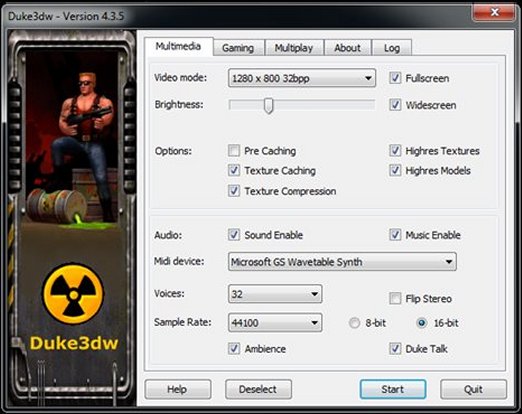
This is a modified version of Jonothan Fowlers Duke3d adding stuff we found necessary.
Although it is important to try and keep the game as original as possible it is often necessary
to make several changes to improve things which adds to the gameplay.
Duke3dw always uses the latest code available from JonoF wherever possible.
Screenshots
Changes in Duke3dw
Version 4.0.2.6
Fixed long path searches.
Added Maps folder to searchpath.
Version 4.0.2.5
Added if a mapname has a mapname.mid then that music will be played.
Fixed music selections in saved games and menus.
Version 4.0.2.4
Fixed where Spacebar clashes with Open key.
Version 4.0.2.3
Added Random Music option to Sound Menu.
Selecting this will randomise the music played while playing a user map.
This overrides the continious dethtoll.mid used for every level.
Version 4.0.2.2
Added Spacebar option to restart level.
Version 4.0.2.1
Fixed monsters freezing when walking after hrp_update.zip.
Fixed new cheatcode messages.
Fixed several log error reports.
Improved hrp compatibility.
Version 4.0.1.0
Fixed all Multiplay operation functions.
Version 4.0.0.0
Version 4 has had a complete overall with major updates and fixes.
1. Extra Menus with video fine tuning.
2. Added several more options.
3. Latest Hrp compatibility.
4. Optional weapon icons in small hud.
5. Fixed screen and hud sizing.
6. Auto reads the Hrp_Update.zip
7. Increase screen size options.
8. Vista sound compatible.
9. Widescreen compatible. (Thanks to Plagman)
Version 3.56
Cheats
Fixed DNGUN# cheat codes.
Version 3.55
File Paths
The Grp/zip files '-g' command can now have a complete path for example:
Duke3dw.exe -gC:\Duke3d\MyAddons\MyTC.grp -xC:\Duke3d\MyAddons\MyTCGame.con
Addon Hrp
If in the above example you have a Hrp for your TC or Addon, just name it as the same name as the Grp file and add _hrp.zip, put it in the same folder and Duke3dw will load it.
For example MyTC_hrp.zip
Maps folder
When using the in game Users option for maps, only folders that start with the word Maps will be displayed.
For example: Maps Maps1 Maps2 Maps3 Mapsdm etc.
-j or /j Command
Although previously added, it has now been updated.
For example if used in a commandline startup as follows:
Duke3dw.exe -jC:\Duke3d\MyAddons
The folder MyAddons will now become part of the general Searchpath for files etc.
This is handy if you want to put all your map or TC files into one folder.
Additional cheat codes
See below near end.
Version v3.50 to v3.54
Sets Autoload folder in general searchpath.
Sets Games folder in general searchpath.
Uses Duke3d_hrp.zip if in Autoload or root folder.
Uses Maphacks.zip if in Autoload or root folder.
Sees user Addon games in ZIP format if in Autoload or Games folders.
Only .bat file needs to be in root folder.
Commandline written to log file.
D3wSetup
Duke3dw comes with its own Setup configuration program D3wSetup.exe
and creates its own Duke3dw.cfg file which replaces the Duke3d.cfg
Highres Loader
If the Duke3d HRP (High Resolution Pack) is zipped as Duke3d_Hrp.zip and stored in the root folder,
it will be automatically loaded.
Huds
Due to the resizing of the screen when switching Huds it was found that too much information was lost when using the small Hud.
Therefore 2 extra Huds were added to Duke3dw to accomodate this.
Cheats
It was also found that in debugging and also many user maps, it was often necessary to call for only one key and not all of them as in DNKEYS.
The following additional cheat codes have now been added:
DNBLUKEY - adds the Blue key.
DNREDKEY - adds the Red key.
DNYELKEY - adds the Yellowonly.
DNGOD - God mode
DNGUN#
Where # =
2 - Adds pistol with 20 ammo
3 - Adds shotgun with 10 ammo
4 - Adds chaingun with 20 ammo
5 - Adds rpg with 5 ammo
6 - Adds handbomb with 6 ammo
7 - Adds shrinker with 5 ammo
8 - Adds devistator with 10 ammo
9 - Adds lazermines with 3 ammo
0 - Adds freezer with 10 ammo
DNFLY - Adds jetpack with 25% flight
DNMEDIC - Adds healthbox with 25% health
DNSWIM - Adds scuba tanks with 25% air
Load / Save Game
"Load Last Saved Game".
This bug has now been corrected in Duke3dw and the keys are much more responsive.
Time and Map info now also displayed.
Precaching
If you hold down the Spacebar, you can escape the startup precaching.